4. Baseline and Follow-up forms, including Samples and PSQ
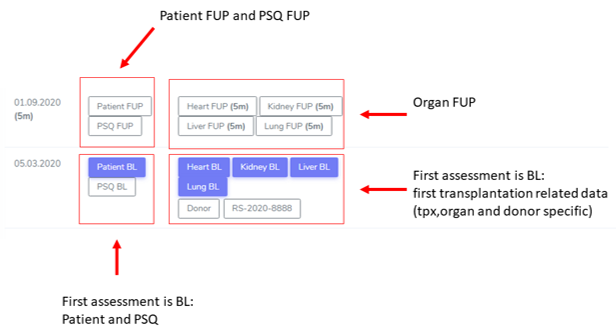
The ‘Patient FUP’ and ‘Organ FUP’ are short overviews with toggles that allow to enter a “yes”, “no” or “missing” for all collected information groups in the ‘Patient Diagnosis List’ and the ‘Organ’.
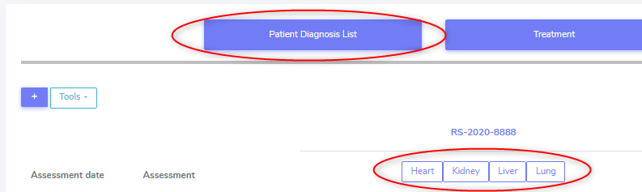
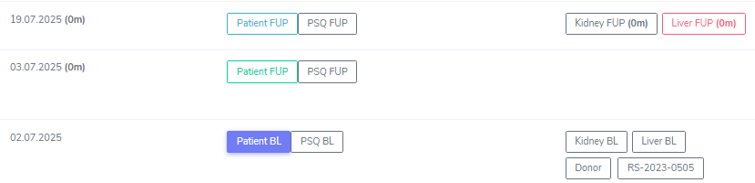
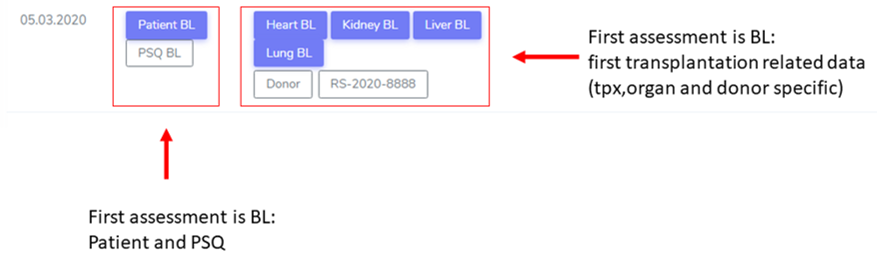
The assessment containers are color-coded, see picture below:
Container with white filling, black outline: created baseline or FUP without entered data
Container with white filling, green outline: data collection is ‘in progress’
Container with white filling, blue outline: ‘Minimal’ dataset collection is complete
Container with white filling, red outline: Organ stop has been registered for that organ
Container with blue fillomg: Full dataset collection is complete
4.1. CRF Status
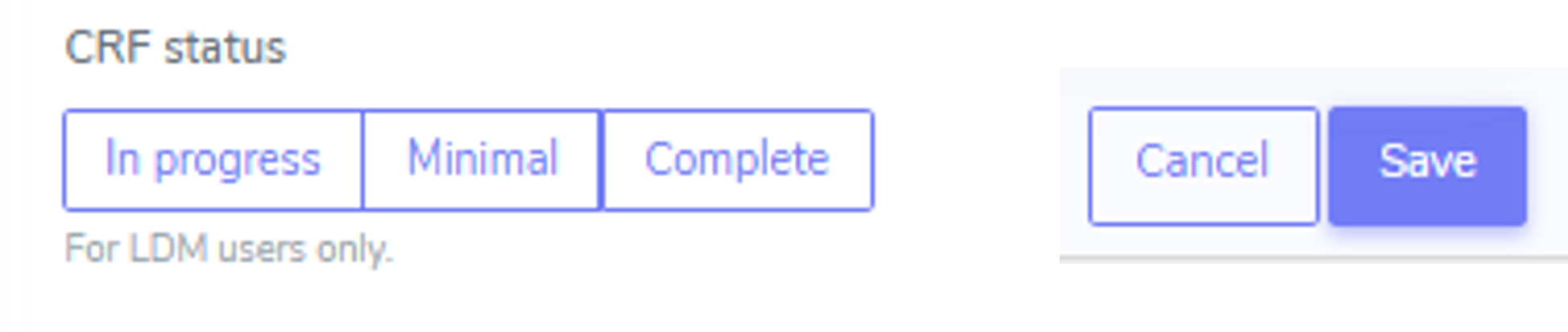
The CRF status which appears on the Patient Overview can be chosen in the Baseline or FUP container at the top left. In order to save a form (bottom right side), a CRF status must be chosen.
4.1.1. Correction of a Follow-up Date
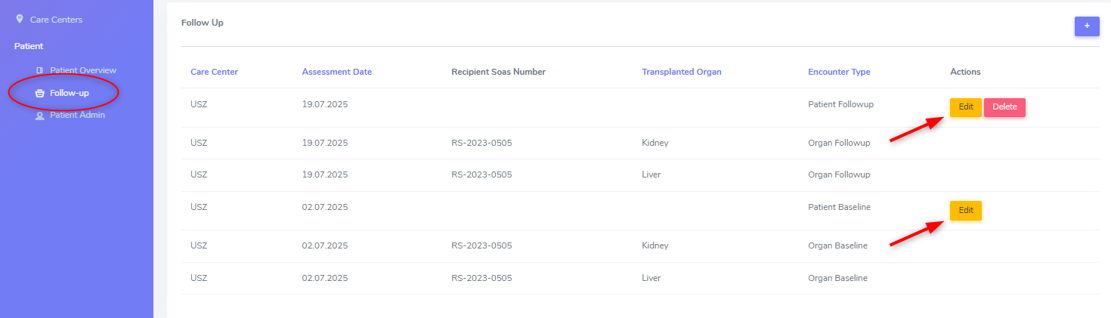
If you entered an incorrect follow-up date and you wish to correct this, then please proceed as follows:
Go to Follow-up (see circle in the figure above).
Choose ‘Edit’ the FUP you need to correct (see arrow in the figure above).
Correct the date(s).
4.1.2. Deletion of a Follow-up Date
Warning
To delete a complete patient case, please contact the STCS IT-departement by openomg a ticket with all relevant information.
If you added a FUP erroneously (e.g. in the false patient), you can delete the last added FUP by chosing ‘Delete’ (see red arrow) in the Follow-up overview.

Please note that already entered data in the ‘Patient Diagnosis List’, the ‘organ’ container’ and/or the ‘Lab’ container are not automatically deleted when deleting an added follow-up.
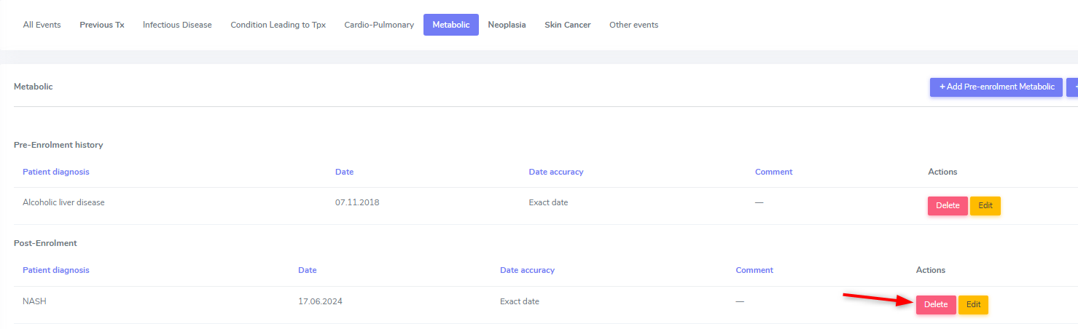
To delete the accidentally entered data, you have to delete them all manually. Access the corresponding container, press ‘Delete’ (see arrow) in the row corresponding to the false entry and confirm your selection.
4.1.3. Assessment Date
The Date of assessment corresponds to the date when the visit was done to collect the patient data. Baseline assessement date usually corresponds to the date of transplantation, and for FUP the date of the patient’s cohort visit.
4.2. Patient Baseline Forms
Warning
All data, which occured prior to and up to transplantation, is considered baseline data. Hence this data will be entered in the patient and case baseline CRFs.
The patient baseline container consists of three sub-sections. The first one, the ‘Pre-enrolment history’, corresponds to that what in the follow-ups is called ‘Post transplant diagnosis’ but will not collect ‘previous transplantations’ in follow-ups. The ‘patient characteristics’ included in this section are referred as ‘Assessments’ in the follow-ups.
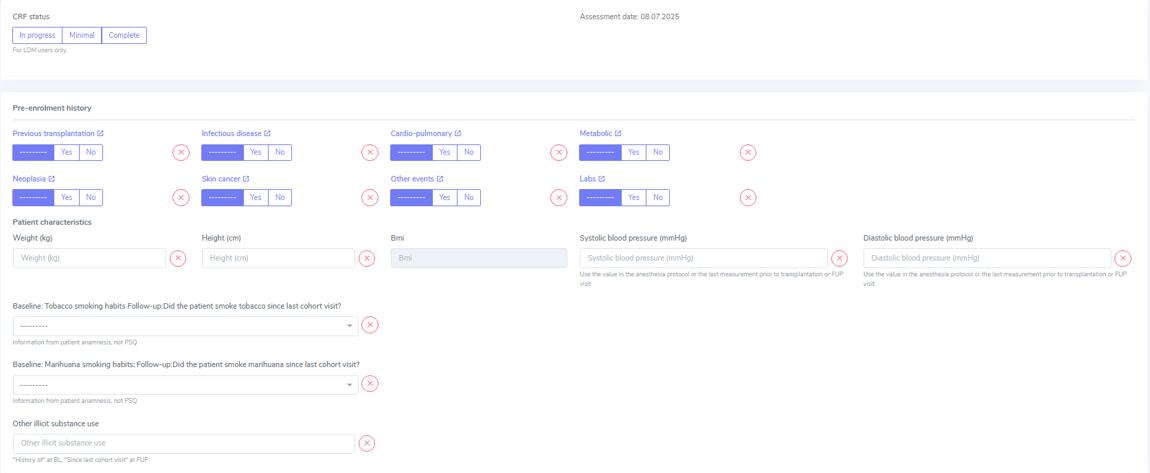
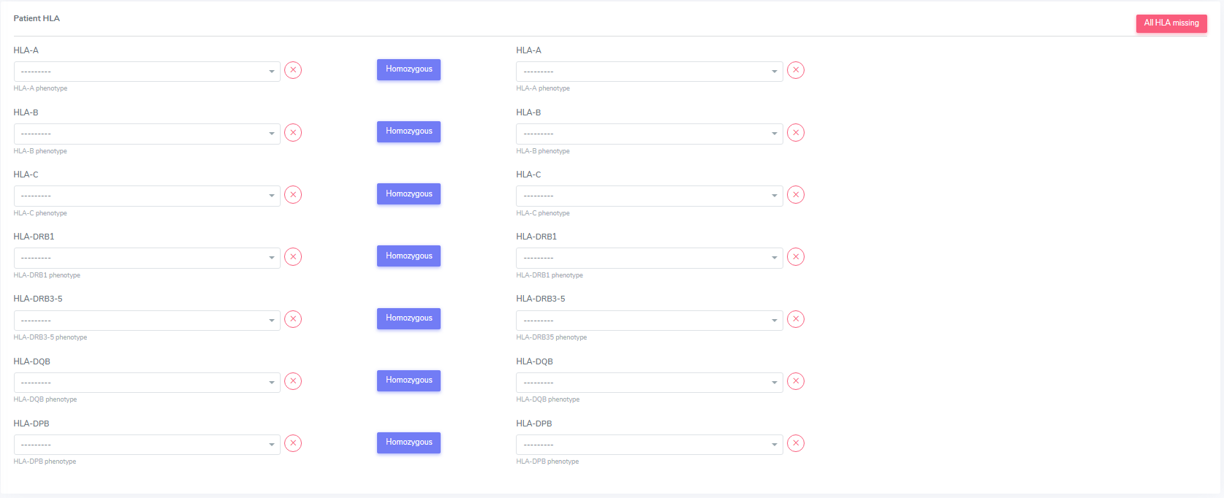
The information in the second and third section (Patient HLA) is only collected once at the data collection of the first ever entered baseline, because it is data that does not change in time.

4.2.1. Pre-enrolment History
The toggles are only here to indicate whether there was an event in the respective cathegory or not before the transplantation.
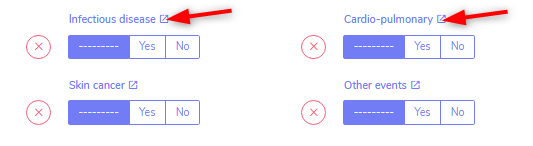
To enter a specific event, click on the title of the event category (see red arrows). This will open the container in a new tab where you will be able to enter the corresponding event(s).
Infectious diseases
We do not collect the whole ID-History of the patient but only major pre-enrollment infectious diseases and infections active at the timepoint of transplantation.
More information regarding the collection of infectious diseases can be found in Patient containers/Patient Diagnosis List/Infectious Disease.
4.2.2. Patient Characteristics
Please use to most recent measurements prior to transplantation. For the blood pressure, you can use the value in the anesthesia protocol or the last measurement prior to transplantation. The BMI will be calculated automatically.
Questions:
Baseline, Tobacco smoking habits:
Current: activates the question of ‘Number of pack years’.
Former: Activates the question of the date when the patient stopped smoking tobaco.
Baseline, Marihuana smoking habits:
Current.
Former: Activates the question of the date when the patient stopped marihuana
Note
Other illicit substance use: Indicate all illicit substances use until transplantation as a free-text.
4.2.3. Ethnicity
In the drop-down list you can choose between ‘Caucasian’ (whiteness), ‘Asian’, ‘African or African American’ and ‘Other’. If you choose ‘Other’, please indicate the ethnicity in the comment field.
4.2.4. Past Immunosuppressive Treatment (including Systemic Corticosteroids)
A patient could have had an immunosuppressive treatment prior to transplantation for different reasons such as a previous transplantation, COPD or rheumatoid arthritis.
If a patient has received immunosuppressive treatments and/or systemic steroids in the past, select the appropriate treatment from the list:
IS treatment combined with systemic steroids.
IS treatment without systemic steroids.
Systemic steorids alone.
4.2.5. Patient HLA
Patient HLA is registered here and only needs to be registered once, even if a patient recieves multiple transplantations (either combined or second or re-TX).
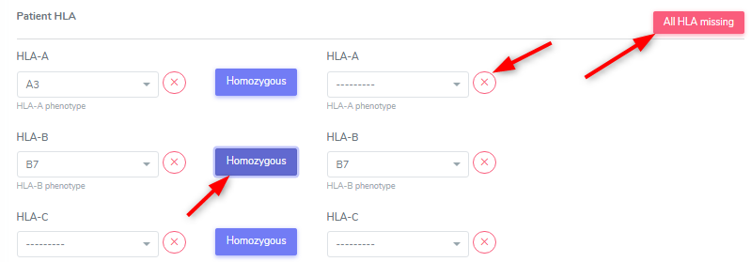
If a HLA is homozygous, you can select the button next to the according HLA instead of searching for it in the second HLA-phenotype list.
Please indicate single missing HLA with the ‘x’, if all HLA is missing (analysis not done) select ‘All HLA missing’ to auto-complete all fields.
If you erroneously selected ‘All HLA missing’ you can undo that by clicking ‘HLA available’. Previously entered HLA will re-appear as long as you did not save the form..
4.2.6. Minimal Data in Patient Baseline
Minimal data that must be collected in the Patient baseline is:
Previous transplantation
Neoplasia
Skin cancer
Lab (only Creatinine) and
Patient HLA
4.3. Organ Baseline Forms

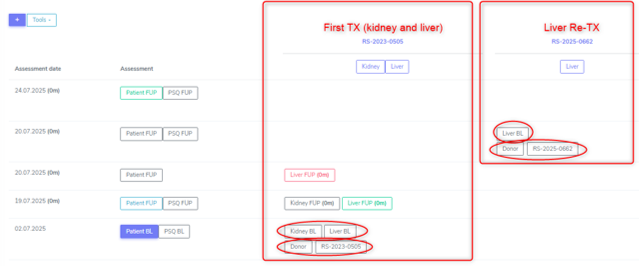
For every transplanted organ, a Baseline container for the corresponding organ (e.g. Liver Tpx -> “Liver BL”, Kidney Tpx -> “Kidney BL”) as well as one Donor and one RS-container will be created.
There will be created two organ containers in a double-transplantation but only one Donor and one RS-container per transplantation case.
If a re-transplantation occours, a new organ baseline container as well as a new Donor and a new RS-container will be created.
4.3.1. Kidney BL
The underlying disease for a kidney transplantation is entered in the ‘Patient Diagnosis List’ in the ‘Condition Leading to Tpx’ and confirmed in the organ container right above the RS-container of the according transplantation.
Please follow the instructions in Chapter 5. Patient containers.
Kidney baseline and peritransplant period/Pre-transplant history and assessments
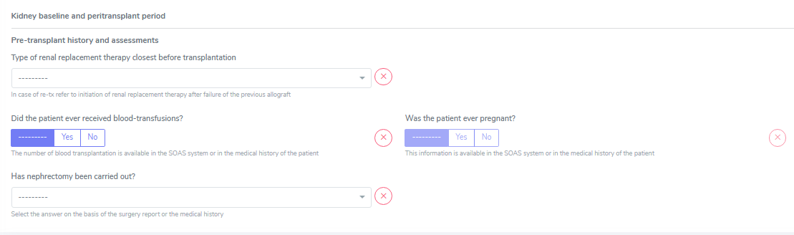
a) Type of renal replacement therapy closest before transplantation: Choose between ‘None’, ‘Peritoneal dialysis’ and ‘Hemodyalisis’.
Type of renal replacement theapy: Enter the type of treatment closest before transplantation.
Date of initiation of renal replacement therapy: If you choose a form of dialysis, please enter the start date of the renal replacement therapy in the according field.
Warning
Enter the date when a replacement therapy was first started - not when the latest treatment was started.

In Re-transplantion
The start-date of the dialysis is always the dialysis concerning the current transplanted organ. If the patient had dialysis and a kidney-TX before (regardless of whether entered and followed in the STCS or not) do not enter this date. This information must be entered in the patient baseline or has already been entered in the concerning organ that is registered in the STCS.
b) Did the patient ever received blood-transfusions?: Choose between ‘Yes’, ‘No’ or ‘Missing’ (in case you have no information regarding blood-transfusions prior to transplantation).
What is considered as blood transfusion?
Platelets transfusion is relevant and should be collected in Kidney BL.
Plasma (usually FFP) is not relevant as it does not cause HLA sensitization.
c) Was the patient ever pregnant?: Choose between ‘Yes’, ‘No’ or ‘Missing’ (in case you have no information regarding childbirths prior to transplantation).
Warning
This information can only be filled in in female patients.
d) Has nephrectomy been carried out?: Choose between ‘No’, ‘Nephrectomy of allograft and nephrectomy of native kidney’, ‘Nephrectomy of a previous kidney allograft ‘, ‘Nephrectomy of the native kidney(s)’.
Kidney transplatation
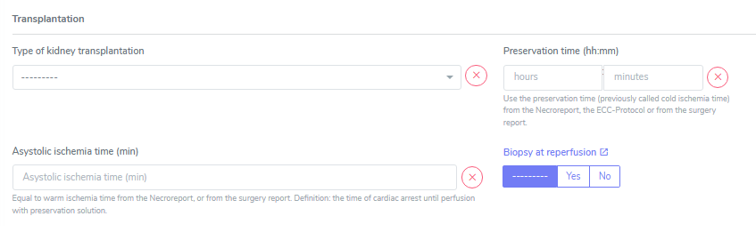
a) Type of kidney transplantation: Choose between ‘Left fossa’, ‘Right fossa’, ‘Double kidney’ or missing (if you have no indication of where the kidney has been implanted).
b) Preservation time (hh:mm) (previously called cold ischemia time): Apperars double if there was a double kidney transplantation. Indicate the preservation time of the left kidney in the left field and the preservation time of the right kidney in the right field.
c) Asystolic ischemia time (min) (previoously called warm ischemia time): Only appears if the donor is a DCD donor. (The information of DBD/DCD donor was already selected when the donor was enrolled).

d) Biopsy at reperfusion: Choose between ‘Yes’, ‘No’ or ‘Missing’ (in case you have no information regarding a biopsy at timepoint of transplantation). When selecting yes, please enter the corresponding biopsy in the kidney organ container/Biopsy&Rejection under the cathegory “Time-zero and reperfusion biopsy”.
In ‘Type of biopsy’ you can select wether the biopsy has been taken pre-implantation or when already implanted and reperfused, but within the transplantation surgery.

Kidney Transplant Function
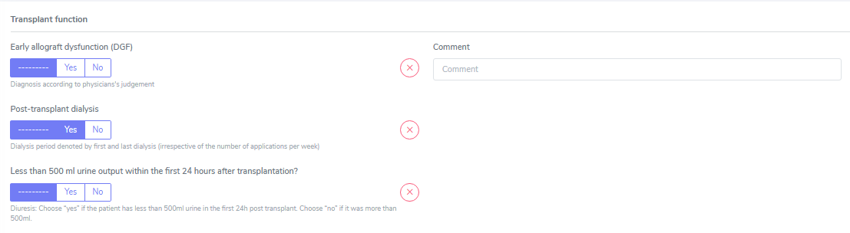
a) Early allograft dysfunction (DGF): Choose between ‘Yes’, ‘No’ or ‘Missing’ (in case you have no information regarding DGF) and see Primary-non function (below) for further information.
b) Post-transplant dialysis: Choose between ‘Yes’, ‘No’ or ‘Missing’ (in case you have no information regarding dialysis after transplantation). When selecting ‘Yes’ please fill in the start and the stop date of the post-transplant dialysis accordingly.

c) Less than 500 ml urine output within the first 24 hours after transplantation?: Choose between ‘Yes’, ‘No’ or ‘Missing’ (in case you have no information regarding the urin output quantity in the first 24 hours after transplantation).
Minimal Data in Kidney Baseline
Minimal data that must be collected in the Kidney baseline is:
Type of kidney transplantation and
Biopsy at reperfusion.
Please fill in the biopsy information in the corresponding organ container.
4.3.2. Heart BL
The underlying disease for a heart transplantation is entered in the ‘Patient Diagnosis List’ in the ‘Condition Leading to Tpx’ and confirmed in the organ container right above the RS-container of the according transplantation. Please follow the instructions in Chapter 5. Patient containers on how to enter the required information.
Heart baseline and peritransplant period/Pre-transplant history and assessments
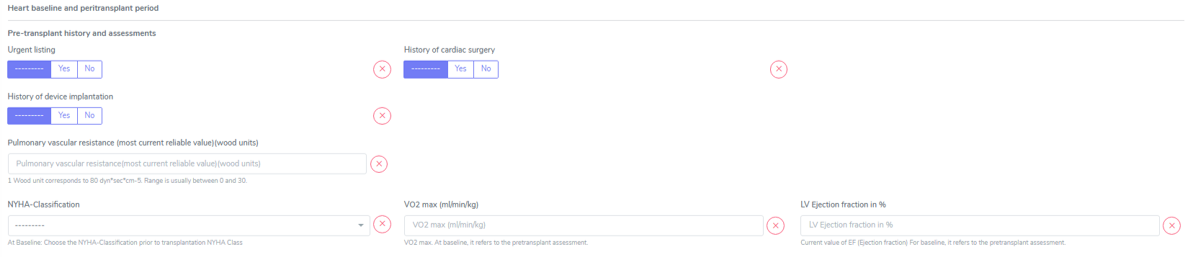
a) Urgent listing: Choose between ‘Yes’, ‘No’ or ‘Missing’ (in case you have no information regarding the listing status for this transplantation).
b) History of cardiac surgery: Choose between ‘Yes’, ‘No’ or ‘Missing’ (in case you have no information regarding cardiac surgery prior to transplantation). When choosing ‘Yes’, select all that apply from the following list:
Type of cardiac surgery:
Previous CABG (Coronry artery bypass surgery, also known as heart bypass surgery)
Previous valvular surgery (Repair and/or replacement)
Ventricular Assist Device (VAD) (LVAD, BerlinHeart, Excor…)
Surgery for congenital heart disease
Other
Note
In case you select Type of cardiac surgery: Ventricular Assist Device (VAD), the History of device implantation is automatically set to ‘yes’. There select Ventricular Assist Device (VAD): VAD days in situ will be replaced by a start and a stop date. The section will be updated after the data revision.
c) History of device implantation: Choose between ‘Yes’, ‘No’ or ‘Missing’ (in case you have no information regarding cardiac surgery prior to transplantation). When choosing ‘Yes’, select all that apply from the following list:
Type of device:
Pacemaker or ICD with leads (traditional ICD, placed in the chest with wires attached to the heart)
Subcutaneous ICD (also called S-ICD, placed under the skin and attached to a sensor that runs along the breastbone. It doesn’t touch the heart.)
Leadless pacemaker (a small, one-piece device. All the parts of a leadless pacemaker are inside one device. There’s no separate battery and the whole device sits in the heart’s right ventricle.)
Cardio MEMS (this system is indicated for the wireless measurement and monitoring of pulmonary artery pressure and heart)
Ventricular Assist Device (VAD) (LVAD, BerlinHeart, Excor…)
Other
d) Pulmonary vascular resistance (wood units): Enter the last available measurement prior to transplantation or ‘Missing’ (in case you have no PVR-value available prior to transplantation).
Note
PVR is commonly expressed in Wood units (mmHg·min/L) or dynes·s/cm^-5. 1 Wood unit corresponds to 80 dyn*sec*cm-5.
e) NYHA-Classification: Select the NYHA-Class last indicated before transplantation or ‘Missing’ (in case you have no information regarding the NYHA-Classification prior to transplantation).
NYHA Class |
Symptoms |
|---|---|
I |
No symptoms and no limitation in ordinary physical activity, e.g. shortness of breath when walking, climbing stairs etc. |
II |
Mild symptoms (mild shortness of breath and/or angina) and slight limitation during ordinary activity. |
III |
Marked limitation in activity due to symptoms, even during less-than-ordinary activity, e.g. walking short distances (20–100 m). Comfortable only at rest. |
IV |
Severe limitations. Experiences symptoms even while at rest. Mostly bedbound patients. |
f) VO2 max (ml/min/kg): Enter the last available measurement prior to transplantation or ‘Missing’ (in case you have no VO2max-value available prior to transplantation).
Note
VO2 max at baseline, it refers to the pretransplant assessment.
g) LV Ejection fraction in %: Enter the last available measurement prior to transplantation or ‘Missing’ (in case you have no EF-value available prior to transplantation).
Heart Transplantion

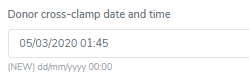
a) Donor cross-clamp date and time: Enter the date and the time the donor aorta has been clamped.
b) Recipient de-clamp date and time: Enter the date and the time aorta has been re-opened in the recipient.
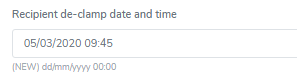
These values are needed to calculate the Cross clamp time, which is the time in which the allograft has not connected to the circulation.
c) Bypass time (min): This is the ECC time (Extra Corporal Circulation time).
d) Biopsy at reperfusion: Choose between ‘Yes’, ‘No’ or ‘Missing’ (in case you have no information regarding a biopsy at timepoint of transplantation).
When selecting ‘Yes’ please enter the corresponding biopsy in the heart organ container/Biopsy&Rejection under the cathegory “Time-zero and reperfusion biopsy”. In ‘Type of biopsy’ you can select whether the biopsy has been taken pre-implantation or when already implanted and reperfused, but within the transplantation surgery.
Heart Transplant Function
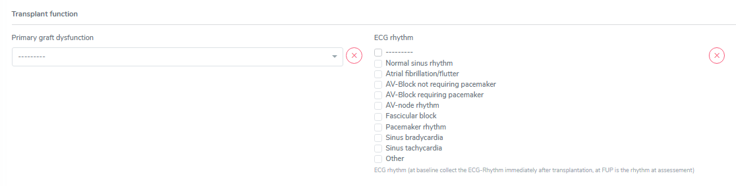
a) Primary graft dysfunction: Choose between ‘No’, ‘Requiring ECLS’, ‘Not requiring ECLS’or ‘Missing’ (in case you have no information regarding a possible graft dysfunction after transplantation).
ECLS (extracorporeal life support) refers to a method of mechanical cardiovascular support. This can be done by means of ECMO (including an oxygenator) or by a pump without an intermediate oxygenator with normal lung function.
b) ECG rhythm: Choose the ECG rhythm immediately after transplantation and select all that apply from the following list:
Normal sinus rhythm
Atrial fibrillation/flutter
AV-Block not requiring pacemaker
AV-Block requiring pacemaker
AV-node rhythm
Fascicular block
Pacemaker rhythm
Sinus bradycardia
Sinus tachycardia
Other
Please enter Primary non-function, How to enter a PNF in 3LC and Biopsies after a PNF or graft loss as in here.
Minimal Data in Heart Baseline
Minimal data that must be collected in the Kidney baseline is:
NYHA classification
VO2 max (ml/min/kg)
LV Ejection fraction %
Primary graft dysfunction
ECG rhythm
Note
Please fill in the biopsy information in the corresponding organ container.
4.3.3. Islets BL
The underlying disease for islets transplantation is entered in the ‘Patient Diagnosis List’ in the ‘Condition Leading to Tpx’ and confirmed in the organ container right above the RS-container of the according transplantation.
Please follow the instructions in Chapter 5. Patient containers on how to enter the required information.
Islets baseline and peritransplant period/ Pre-transplant history and assessments
a) Number of islet equivalents (IEQ/kg body weight): Enter the number of transplanted islets. If the number is >15.000, then it needs to be divided by the bodyweight (in KG) of the recipient to indicate the right quantity.
b) Root of infusion: Please select the root of the infused islets from ‘Intrahepatic’, ‘Portal vein infusion’ or ‘Other’. In case of ‘Other’, please indicate the root of infusion in the comment field.
c) Early allograft dysfunction (DGF): Choose between ‘Yes’, ‘No’ or ‘Missing’ (in case you have no information regarding a possible early allograft dysfunction). When selecting ‘Yes’, please fill in the start and the stop date of the delayed graft function (DGF) accordingly.

Please enter Primary non-function. How to enter a PNF in 3LC and Biopsies after a PNF or graft loss as in here.
Minimal Data in Islets Baseline
In islets baselines no minimal data are collected. Simply put the form on minimal and save it.
4.3.4. Liver BL
The underlying disease for a liver transplantation is entered in the ‘Patient Diagnosis List’ in the ‘Condition Leading to Tpx’ and confirmed in the organ container right above the RS-container of the according transplantation. Please follow the instructions in Chapter 5. Patient containers on how to enter the required information.
Liver baseline and per transplant period/Pre-transplant history and assessments
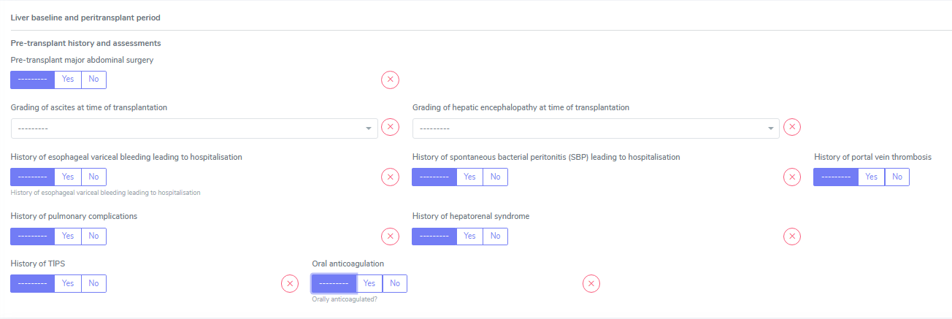
a) Pre-transplant major abdominal surgery: Choose between ‘Yes’, ‘No’ or ‘Missing’ (in case you have no information regarding major abdominal surgery prior to transplantation).
When choosing ‘Yes’, select all that apply from the following list:
Open cholecystectomy
Previous liver operation
Pancreas operation
Stomach surgery
Other
b) Grading of ascites at time of transplantation: Choose from ‘Absent’, ‘Lild-Moderate/Treatable’, ‘Severe/Refractory’ or ‘Missing’ (if you do not have information obout wheter the patient has had ascites at timepoint of transplantation or do not have a clear indication of the grade of the ascites at timepoint of transplantation).
Warning
Ascites is considered refractory if it can no longer be treated with medication alone, i.e. if the patient requires therapeutic ascites punctures and/or a TIPS insertion (Mail from B. Müllhaupt, 12.11.2014).
c) Grading of hepatic encephalopathy at time of transplantation: Choose between ‘Absent’, ‘State I-II’, ‘State III-IV’ or ‘Missing’ (if you do not have information obout wheter the patient has had hepatic encephalopathy at timepoint of transplantation or do not have a clear indication of the grade of the hepatic encephalopathy at timepoint of transplantation).
Stage of encephalopathy: |
|
|---|---|
Stage I |
Sleep disturbances, restlessness, mood fluctuations, loquacity (talkativeness), impaired attention/concentration, often-slight finger tremor. |
Stage II |
Detectable neuromuscular disturbances (e.g.flapping tremor or asterixis), ataxia, changes in reflexes (usually diminution), dysarthria. |
Stage III |
Increased impairment of consciousness,aggressive behaviour, monotonous voice,perseverations, increased reflexes, clonic spasm,pyramidal symptoms, increased muscle tone |
Stage IV |
Coma |
d) History of esophageal variceal bleeding leading to hospitalisation: Choose between ‘Yes’, ‘No’ or ‘Missing’ (in case you have no information regarding esophageal variceal bleeding leading to hospitalisation).
e) History of spontaneous bacterial peritonitis (SBP) leading to hospitalisation: Choose between ‘Yes’, ‘No’ or ‘Missing’ (in case you have no information regarding SPB leading to hospitalisation).
f) History of portal vein thrombosis: Choose between ‘Yes’, ‘No’ or ‘Missing’ (in case you have no information regarding portal vein thrombosis prior to transplantation).
g) History of pulmonary complications: Choose between ‘Yes’, ‘No’ or ‘Missing’ (in case you have no information regarding pulmonary complications prior to transplantation). When choosing ‘Yes’, select all that apply from the following list:
Hepato-pulmonary syndrome
Porto-pulmonary hypertension
Hydrothorax
h) History of hepatorenal syndrome: Choose between ‘Yes’, ‘No’ or ‘Missing’ (in case you have no information regarding hepatorenal syndrome prior to transplantation). If the patient required dialysis or hemofiltration in the past, enter this information in the ‘Patient Diagnosis List’ /’Metabolic’ in Pre-enrolment Metabolic (or Post-enrolment Metabolic in case of a second or re-transplantation) as ‘Acute renal failure’ or ‘Chronic kidney disease’ choosing also if the patient needed a renal replacement therapy (Yes or No).
i) History of TIPS: Choose between ‘Yes’, ‘No’ or ‘Missing’ (in case you have no information regarding TIPS prior to transplantation). When choosing ‘Yes’, select all that apply from the following list:
Refractory ascites
Esophageal variceal bleeding
j) Oral anticoagulation: Choose between ‘Yes’, ‘No’ or ‘Missing’ (in case you have no information regarding oral anticoagulation prior to transplantation).
Liver Allocation:
a) Status at allocation: Please select the allocation status from the following list:
Swiss urgency
Super urgent
Lab MELD
MELD exception, standard
MELD exception, non-standard
MELD upgrade
b) Allocation MELD score from SOAS: Enter the MELD-score (provided by SOAS) that has been used for the allocation of the transplanted organ.
c) Lab MELD score from SOAS: Enter the last calculated MELD-score prior to transplantation.
Note
The fields ‘Current meld score’, ‘Calculated MELD-XI’ and ‘Child score’ are historical values, meaning a value only appear in this gray field if it was entered/calculated in the previous system.
Liver Transplantation
a) Type of Liver transplantation: Choose between ‘Domino graft, ‘Whole liver’, ‘Partial liver’ or missing (if you have no indication of the size of the implanted liver).
b) Preservation time (hh:mm) (previously called cold ischemia time).
c) Asystolic ischemia time (min) (previously called warm ischemia time): this only appears if the donor is a DCD donor.
d) Biopsy at reperfusion: Choose between ‘Yes’, ‘No’ or ‘Missing’ (in case you have no information regarding a biopsy at timepoint of transplantation). When selecting yes, please enter the corresponding biopsy in the liver organ container/Biopsy&Rejection under the cathegory “’Time-zero and reperfusion biopsy”. In ‘Type of biopsy’ you can select wether the biopsy has been taken pre-implantation or when already implanted and reperfused, but within the transplantation surgery.

e) Surgery duration (hh:mm): Use the surgery duration value in the surgical report of the patient. In case of multiple transplantations also use the value in the surgical report. Do not split the duration.
f) Weight of liver graft (gr): enter the weight of the transplanted liver graft or choose ‘Missing’ if you do not have an information of the weight.
Liver Transplant function
a) Early allograft dysfunction (DGF): Choose between ‘Yes’, ‘No’ or ‘Missing’ (in case you have no information regarding a possible early allograft dysfunction). When selecting ‘Yes’, please fill in the start and the stop date of the delayed graft function (DGF) accordingly.

Please enter Primary non-function. How to enter a PNF in 3LC and Biopsies after a PNF or graft loss as in here.
Minimal Data in Liver Baseline
Minimal data that must be collected in the Kidney baseline is:
Type of liver transplantation and
Biopsy at reperfusion.
Please fill in the biopsy information in the corresponding organ container.
4.3.5. Lung BL
The underlying disease for a lung transplantation is entered in the ‘Patient Diagnosis List’ in the ‘Condition Leading to Tpx’ and confirmed in the organ container right above the RS-container of the according transplantation.
Please follow the instructions in Chapter 5. Patient containers on how to enter the required information.
Lung baseline and peritransplant period/ Pre-transplant history and assessments
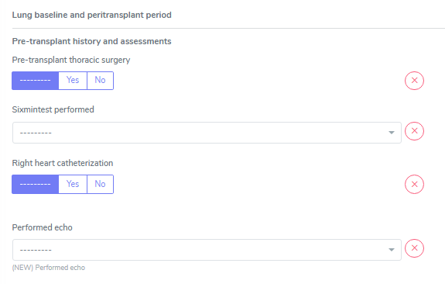
a) Pre-transplant thoracic surgery: Choose between ‘Yes’, ‘No’ or ‘Missing’ (in case you have no information regarding a pre-transplant thoracic surgery). Consider everything as surgery that has been done under anesthesia/in the OR. Everything applies, except pure chest wall interventions. That means all interventions on the lungs and heart. A pleural drainage does not qualify. However, if talc installation is done, please report it.
b) Sixmintest performed: Choose between ‘Yes’, ‘No’ or ‘Missing’ (in case you have no information regarding a pre-transplant six minutes walking test). When selecting ‘Yes’, please fill in the date of the performed walking test and the distance completed in the test accordingly.
c) Right heart catheterization: Choose between ‘Yes’, ‘No’ or ‘Missing’ (in case you have no information regarding a pre-transplant right heart catheterization). When selecting ‘Yes’, please fill in the date of the heart catheterization, the Pulmonary artery mean pressure (mPAP), the Pulmonary vascular resistance (in wood units) and the Systolic pulmonary pressure (sPAP) accordingly. Please use the most current value.

d) Performed echo: Choose between ‘Yes’, ‘No’ or ‘Missing’ (in case you have no information regarding a pre-transplant echocardiography). When selecting ‘Yes’, please fill in the date of the performed echo and the measured LVEF in the test accordingly. Use the most recent echo before transplantation.

Lung transplantation:
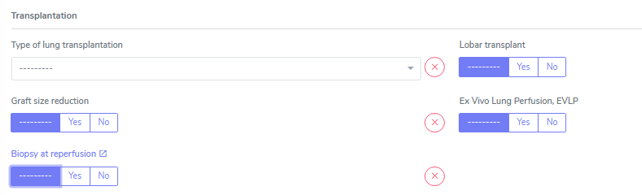
a) Type of lung transplantation: Choose between ‘Left lung’, ‘Right lung’, Double lung’ or ‘Missing’ (in case you have no information regarding the transplanted part of the lung).
b) Lobar transplant: Choose between ‘Yes’, ‘No’ or ‘Missing’ (in case you have no information regarding the exact size of the transplanted organ). Lobar lung transplant involves implanting a single lobe from each lung instead of the usual full-lung implant, thus ameliorating the size difference between donor and recipient.
c) Graft size reduction: Choose between ‘Yes’, ‘No’ or ‘Missing’ (in case you have no information regarding the exact size of the transplanted organ). When selecting yes, please select all transplanted lobes from the list. In lung transplantation, graft size reduction techniques like lobectomy and peripheral segmental resection aim to address size mismatches between donor lungs and recipients.

d) Ex Vivo Lung Perfusion, EVLP: Choose between ‘Yes’, ‘No’ or ‘Missing’ (in case you have no information the perfusion of the lung allograft before transplantation).EVLP Ex vivo lung perfusion (EVLP) is a technology used to assess and rehabilitate donor lungs outside the body prior to transplantation. The lungs are connected to a device that mimics the body in order to supply them with nutrients and oxygen and assess their function. The aim is to improve donor lungs and make lungs that would otherwise be considered unsuitable for transplantation, thereby increasing the number of transplants.
e) Biopsy at reperfusion: Choose between ‘Yes’, ‘No’ or ‘Missing’ (in case you have no information regrding a biopsy at timepoint of transplantation) When selecting yes please enter the corresponding biopsy in the lung organ container/Biopsy&Rejection under the cathegory “Time-zero and reperfusion biopsy”. In the ‘Type of biopsy’ cathegory please select ‘Pre-implantation (allograft)’ or ‘At reperfusion’ depending on if the biopsy has been taken pre- or post-implantation in the recipient.
(Lung) Preservation time
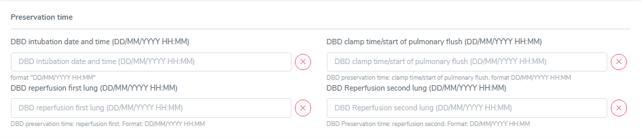
In the preservation times(s) of a lung transplantation the requested data differ depending on wether the donor is a DBD or a DCD donor. All information should be found in the surgery report or via TPX-coordination in your hospital.
In DBD donors we indicate the following timepoints in the format DD/MM/YYYY HH:MM (e.g. 01/03/2020 09:30):
a) DBD intubation date and time
b) DBD clamp time/start of pulmonary flush
c) DBD reperfusion first lung
d) DBD Reperfusion second lung This field only appears, if ‘double lung’ has been choosen in ‘type of lung transplantation’. Otherwise only the DBD reperfusion first lung appears.
Primary graft dysfunction and primary non function in Lung
Primary graft dysfunction (PGD) refers to the syndrome of acute lung injury early after lung transplantation (LTx). It is calculated with the following scheme:
Grade |
Grade Pulmonary edema on chest X-ray |
Pao2/Fio2 ratio |
|---|---|---|
PGD grade 0 |
No |
> 300 |
PGD grade 1 |
Yes |
> 300 |
PGD grade 2 |
Yes |
200 to 300 |
PGD grade 3 |
Yes |
< 200 |
a) Grading of primary graft dysfunction (PGD) severity at 24h: Select from Grade 0, grade 1, grade 2, grade 3 or missing (in case you have no values to calculate the PGD).
b) Grading of primary graft dysfunction (PGD) severity at 48h: Select from Grade 0, grade 1, grade 2, grade 3 or missing (in case you have no values to calculate the PGD).
c) Grading of primary graft dysfunction (PGD) severity at 72h: Select from Grade 0, grade 1, grade 2, grade 3 or missing (in case you have no values to calculate the PGD).
Primary non-function
Primary non-function (PNF) definition: The transplanted organ never started working (properly)
Date for PNF in 3LC: Date of diagnosis of PNF by a physician. This might be days or weeks after transplantation.
Warning
If the date of PNF is the same as the transplantation date, please set the date of the FUP and the PNF on the day after the transplantation and open a ticket and ask the Admin to change it to the transplantation date.
First set the toggle “graft loss”/ “End of transplant episode” in the FUP to yes.
In allograft morbidities enter a graft-loss and enter the date of the graft loss.
As cause of graft loss chose primary non-function and then in the drop-down list that appears enter the cause of the PNF.
Biopsies after a PNF or a graft loss
Biopsies taken from the transplanted graft up to 6 weeks after a global event such as a primary non function or a graft loss should be entered in the system. Please add in the comment field that the date of the biopsy is after the organ loss.
Minimal Data in Lung Baseline
Minimal data that must be collected in the Kidney baseline is: • Type of lung transplantation • Biopsy at reperfusion and • Primary graft dysfunction. Please fill in the biopsy information in the corresponding organ container.
4.3.6. Pancreas BL
The underlying disease for a pancreas transplantation is entered in the ‘Patient Diagnosis List’, in the ‘Condition Leading to Tpx’, and confirmed in the organ container right above the RS-container of the according transplantation.
Please follow the instructions in chapter 5. Patient containers on how to enter the required information.
Pancreas baseline and peritransplant period
Average daily insulin requirement during the previous week (Units/d): The requirement is the total of basal and bolus insulin (including corrections/auto-corrections if a patient uses an insulin pump) applied per day. As this quantity may vary from day to day, enter the avarage (total of 7 days divided by 7).
(Pancreas) Transplantation
Preservation time (hh:mm) was previously called cold ischemia time.
(Pancreas) Transplant function
Early allograft dysfunction (DGF): Choose between ‘Yes’, ‘No’ or ‘Missing’ (in case you have no information regarding a possible early allograft dysfunction). When selecting ‘Yes’, please fill in the start and the stop date of the delayed graft function (DGF) accordingly.

Early allograft dysfunction (DGF) and primary non function in Pancreas
Early allograft dysfunction is defined by the use of insulin after transplantation. Other than in islets TPX, after a pancreas TPX the patient should no longer be insulin-dependent.
As ‘delayed graft function end date’ enter the same date as the stop date of the insulin application in the ‘other drugs’.
Primary non-function
Primary non-function (PNF) definition: The transplanted organ never started working (properly)
Date for PNF in 3LC: Date of diagnosis of PNF by a physician. This might be days or weeks after transplantation.
Warning
If the date of PNF is the same as the transplantation date, please set the date of the FUP and the PNF on the day after the transplantation and open a ticket and ask the Admin to change it to the transplantation date.
First set the toggle “graft loss”/ “End of transplant episode” in the FUP to yes.
In allograft morbidities enter a graft-loss and enter the date of the graft loss.
As cause of graft loss chose primary non-function and then in the drop-down list that appears enter the cause of the PNF.
4.3.7. Small Bowel BL
In construction
4.4. Donor Form

In the donor form, we enter the donor specific information. Donor information is only registered once, even if a donor donates multiple organs (to different centers). This means that all the information entered by the first center entering data also appears in the donor form of this donor in the other centers. However, the donor form is not set to complete if an other transplant center completes the missing values so you need to open the form and set it to ‘complete’ manually.
a) Donor characteristics only request the cause of donor death. Please select from the list and in case of ‘other’ indicate the cause of death in the comment field:
Cause of donor death
Anoxia (ANX)
Brain cancer
Cerebral disease (CDI)
Cerebral hemorrhage (CHE)
Cerebral trauma (CTR)
Suicide (SUI)
Other cause (OTH)
b) Donor Serology requests the results of the donor serology lab prior to donation. Values can be entered as ‘negative’, ‘positive’ or ‘missing’ (in case the result is not available/ a test has not been performed).
Note
General Rule: all borderline results are entered as ‘positive’.
c) Donor HLA
Tip
If you erroneously selected ‘All HLA missing’ you can undo that by clicking ‘HLA available’. Previously entered HLA will re-appear as long as you did not save the form..
The donor form is the same for all organs except heart and lung, where an additional field, ‘Transplant related information’ appears.
a) For a heart donor the requested values are:
Donor myocardial contusion. Choose between ‘Yes’, ‘No’ or ‘Missing’ (in case you have no information regarding a possible myocardial contusion).
Donor EF in %. Enter the (last) available EF of the donor
Graft coronary artery disease (CAD). Choose between ‘Yes’, ‘No’ or ‘Missing’ (in case you have no information regarding CAD). When selecting ‘Yes’, please select the ‘Treatment of graft CAD’ from ‘No’, ‘Bypass’, ‘Stenting’ or ‘Missing’ (in case you have no information regarding the treatment of CAD).
Graft valvular disease. Choose between ‘Yes’, ‘No’ or ‘Missing’ (in case you have no information regarding a possible graft valvular disease).
b) For a lung donor the requested values are:
Donor height
Donor smoking history.
Note
In case of the indication of a positive donor history (‘At time of donation’ or ‘former’) please indicate the donor’s number of pack years. (Pack years: Smoking one package per day during one year = 1 packyear. Smoking one package per day for 20 years = 20 packyears.)
Tip
In case of a combined heart and lung transplantation, the requested data all appear under the same ‘Transplant related information’ category.
Minimal data that must be collected in the Donor form is: Donor HLA.
4.5. RS-Form

a) ABO compatibility:
The ABO compatibility field is pre-filled with the information entered in the recipient blood group (Administrative data in the Patient Enrolment) and in the recipient blood group (Donor Enrolment) and cannot be changed.
Please confirm the ABO incompatibility by checking the box (see below).

b) Hospitalization:
Hospitalization start-date for the transplantation procedure: this is the time when the patient was admitted to any hospital for the purpose of transplantation. This is pre-filled with the date entered when the transplantation was registered. Be careful to chose the start date corresponding to the case-number of the transplantation.
Hospitalization stop-date for the transplantation procedure: This means the discarge from the transplant hospital. If a patient is transferred to a regional hospital or a rehabilitation, we do not use the discharge date from that stay but the first discharge date from the transplant-hospital.
However, if a patient is transferred to a regional hospital from the TPX-procedure provider after transplantation (for treatment and care connected to the TPX), we enter this information as follows:
Enter a TX-related hospitalization in the Patient Admin/Associated HCP selecting the regional hospital as HCP for the time period of the hospitalization.
If you do not have a discharge date, select ‘missing’. In the comment field, please enter ‘hospitalization following TPX’.
Warning
Please be aware, that a rehabilitation does not count as hospitalization period.

c) Section Serology:
Serology requests the results of the most actual recipient lab prior to transplantation. Values can be entered as ‘negative’, ‘positive’ or ‘missing’ (in case the result is not available/ a test has not been performed).
Tip
General Rule: all borderline results are entered as ‘positive’.
d) Lab Virology:
Virology requests the results of the recipient lab prior to transplantation. Values can be entered as numbers or ‘missing’ (in case the result is not available/a test has not been performed).
In the ‘Detection field’ please select from ‘Below detection limit’, ‘Measurable’ and ‘Above detection limit’.
When selecting ‘Below detection limit’ be sure to enter the limit of the lab or ‘0’ according to the lab result.
In case of a mesurement ‘Above detection limit’, please select ‘missing’ in the result field.
e) HLA antibodies closest to transplantation:
Enter here the most recent HLA-lab prior to transplantation or choose ‘missing’ if no test has been done prior to transplantation.
f) Transplantation based only on virtual crossmatch (no prospective cell-based crossmatch performed):
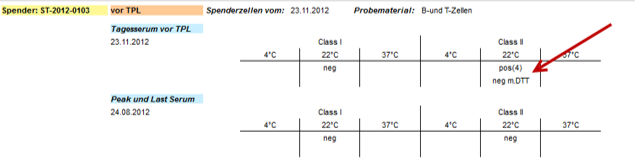
Please select this checkbox if no prospective cell-based crossmatch has been performed (see below).

g) Cell-based crossmatch:
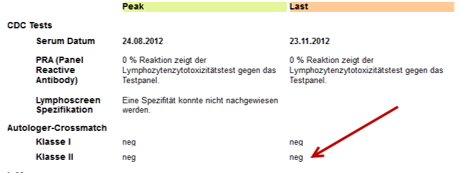
If a crossmatch test has been done, please enter the last available result here.

Note
If there is a positive Crossmatch, a test with DTT-solution will be done to confirm a positive result. If this DDT-test is negative, then the result of the Crossmatch will also be seen as negative. (Information from Typisierungslabor USZ on 26.01.2015)
Example:
Heart, liver and lung transplantations
Note
The Perioperative and ICU care only appears in heart and lung transplantations.
a) Number of transfused EC blood units (bags): Enter the quantity of transfused ECs during the ICU stay. If a patient is re-admitted to the ICU within 24 hours, please count the ECs needed in this ICU stay to the total amount of transfused EC blood units during the ICU care. If between the ICU stays there is a gap of more than 24 hours, the EC bags needed in the following ICU care stay(s) are not relevant for the total ammount of transfused EC bags.
b) Admission to ICU: Select from ‘Yes’ or ‘No’. When selecting ‘Yes’, indicate if the admission phase was pre-or post-operative. Indicate pre-operative ICU care only if hospitalizations on the ICU were due to medical conditions (intubation, catecholamine, …). Post -TX refers to an ICU-admission following the transplant-surgery. As start date you can enter the surgery date if the patient was transferred from the OR to the ICU directly. In case of a pre-and post operative ICU hospitalisation, please enter both using the ‘+’ on the right side. Stop date of pre- and start date of post-operative admission date might correspond. In case of re-admission to the ICU after a post-operative ICU phase, add this as well.
Note
If a patient is admitted to the ICU pre-TX for reasons of intra-hospital logistics for a few hours until the surgery, this is not considered as pre-operative ICU stay.
c) Renal replacement therapy: Select from ‘Yes’ or ‘No’. When selecting ‘Yes’, indicate if the start and the stop date of the renal replacement therapy. If a patient stays on dialysis after trasplantation, enter the stop date as ‘Missing’.
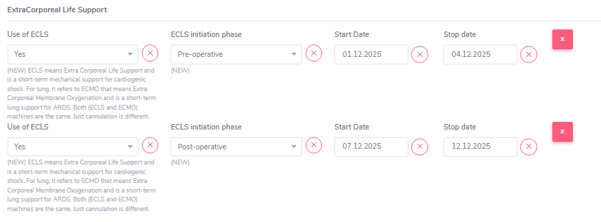
d) ExtraCorporeal Life Support: Select from ‘Yes’ or ‘No’. When selecting ‘Yes’, indicate if the initiation (start) phase was pre-, intra- or post-operative. If a patient had an ECLS phase that lasts from pre-operative to post-operative, select pre-operative initiation phase and enter the exact start and stop date. If a patient then has a further ECLS-period post-operatively, add another use of ECLS, selecting post-operative initiation phase.
The following is an example for a pre- and post operative ECLS dependence with assumed TPX-date on 03.12.2025:
Tip
ECLS means Extra Corporeal Life Support and is a short-term mechanical support for cardiogenic shock. For lung, it refers to ECMO that means Extra Corporeal Membrane Oxygenation and is a short-term lung support for ARDS. Both (ECLS and ECMO) machines are the same. Just cannulation is different.
e) Mechanical Ventilation (invasive): Select from ‘Yes’ or ‘No’. When selecting ‘Yes’, indicate if the initiation (start) phase was pre-operative or if it was a post-operative re-intubation. If a patient had a combination of both or even multiple intubation periods post-surgery, enter all the intubation periods apply using the ‘+’ on the right side.
Tip
We only register invasive ventilation (endotracheal intubation or ventilation via tracheostoma). Non-invasive ventilation (NIV) of any kind is not registered.
Minimal Data in RS - Form
Minimal data that must be collected in the Donor form is:
Hospitalization start date (auto completed with date that was entered at the registration of the transplantation)
HLA antibodies closest to transplantation
Remote DSA
Transplantation based only on virtual crossmatch / Cell-based crossmatch
4.6. Patient Follow-up Forms
FUP 6 months: Follow-up period collects events after re-perfusion until and including date of follow-up six months. Every other FUP: Follow-up period collects events starting the day after the last follow-up until and including date of actual follow-up.
The toggles are only here to indicate wheter there was an event in the respective cathegory or not before the transplantation.
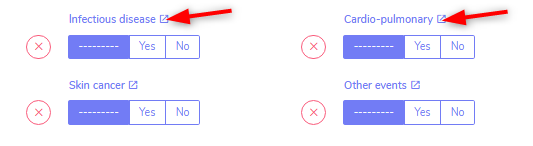
To enter a specific event, click on the title of the event cathegory. This will open the container in a new tab where you will be able to enter the corresponding event(s).
4.6.1. Post transplant Diagnosis
The toggles are only here to indicate wheter there was an event in the respective cathegory or not since the last assessment (baseline or follow-up).

To enter a specific event, click on the title of the event cathegory. This will open the container in a new tab where you will be able to enter the corresponding event(s).
Infectious diseases
If you do not have (yet) information regarding the occourrence of an infection in the actual follow-up period, there might be different reasons for it. Please indicate the reason for the missing information in the drop down list and select from:
Awaiting confirmation
No information from external hospital available
No information from GP available
Patient death or drop-out
Patient did not attend follow-up visit
Other
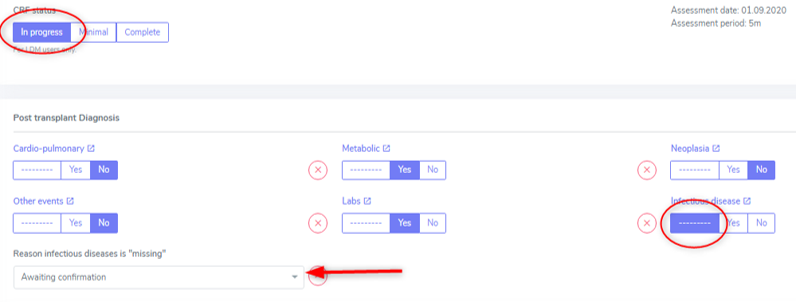
If you are awaiting the confirmation of possible IDs from a physician, you can leave the toggle on ‘——-’ and select ‘awaiting confirmation’ but be sure to leave the CRF status as ‘in progress’. When you receive confirmation (or negation) of the suspected infection, do not forget to change the toggle to ‘Yes’ or ‘No’ and set the CRF status to complete. If needed, add the reported/confirmed ID in the ‘infectious diseases’ container.
More information regarding the collection of infectious diseases can be found in Patient containers/Patient Diagnosis List/Infectious Disease.
4.6.2. Assessments
Please use to most recent measurements prior to or on the day of follow-up. The BMI will be calculated automatically.
Questions
The questions are just formal and no additional information to a ‘Yes’, ‘No’ or ‘missing’ is added anywhere. Did the patient smoke tobacco since last cohort visit? Did the patient smoke marihuana since last cohort visit?
In the section of ‘Other illicit substance use’, please indicate all illegal drugs the patient consumed in this follow-up period.
4.7. Organ Follow-Up forms
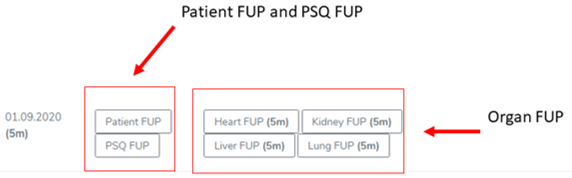
All events that occur after re-perfusion respectively from the first day after the last follow-up including the day of the actual follow-up are registered in the corresponding follow-up period.
The toggles are only here to indicate wheter there was an event in the respective cathegory or not after the transplantation.

To enter a specific event, click on the title of the event category. This will open the container in a new tab, where you will be able to enter the corresponding event(s).
Minimial Data in Patient Follow-up Form:
The minimal data that must be collected in the Patient FUP form is: • Neoplasia • Skin cancer and • Labs
4.7.1 Kidney

Kidney Longitudinal Assessment
In the Kidney FUP form, as in the Patient FUP form, you find toggles that indicate if in the according FUP-period a specific test has been performed or an event has happened. Accordingly you can select between ‘Yes’, ‘No’ and ‘Missing’ (if you have no information regarding a performed test or the happening of en event). The only specific entry you have to do in the Kidney FUP form is, if a screening for BKV infection has been performed.
Screening for BKV infection
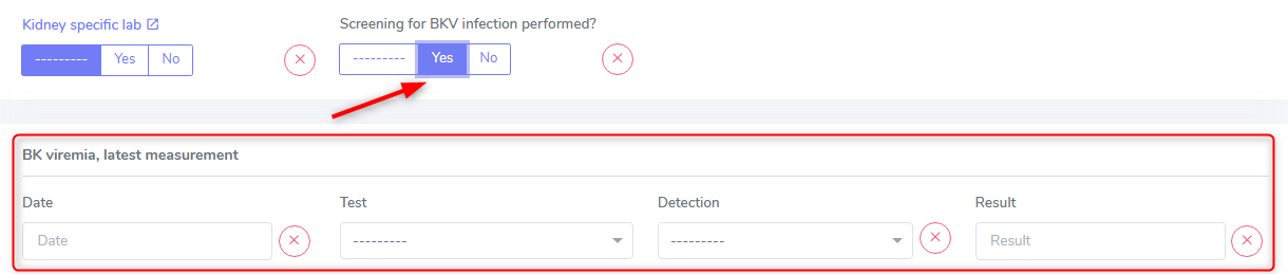
When you select ‘Yes’ in the question if Screening for BKV infection has been performed, you’ll be able to enter the latest available BKV result.
Be sure to select the right test-unit (IU/ml or copies/ml) in the test section.
If the result of BKV is negative, select ‘below detection limit’ and put 0 in as result. Otherwise select ‘measurable’ and fill in the quantity.
Minimal Data in Kidney Follow-up Form
Minimal data that must be collected in the Kidney FUP form is:
Graft loss
Biopsy and rejection
Kidney specific lab and
Screening for BKV infection
4.7.2. Heart

In the Heart FUP form, as in the Patient FUP form, you find toggles that indicate if in the respective FUP-period, a specific test has been performed or an event has happened. Accordingly you can select between ‘Yes’, ‘No’ and ‘Missing’ (in case you have no information regarding a performed test or the occurance of en event).
The specific entries you have to do in the Heart FUP are all found in the Assessment section and correspond to:
Performed echo
NYHA classification
VO2max (ml/min/kg) and the most actual
ECG rhythm.
Assessments
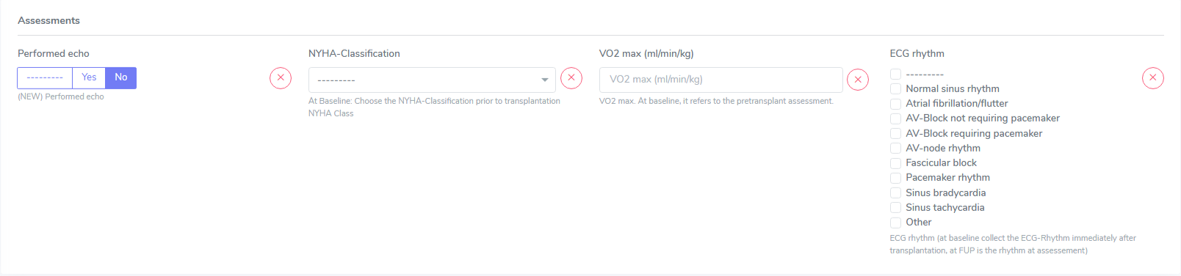
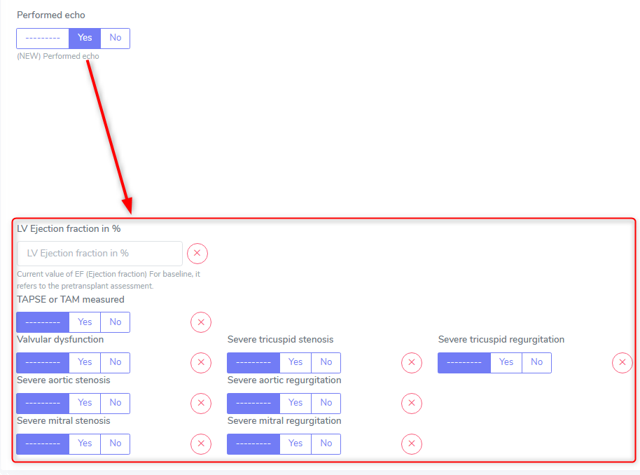
a) Performed echo: Choose between ‘Yes’, ‘No’ or ‘Missing’ (in case you have no information regarding the performance of an echo in the FUP period). By selecting ‘Yes’, you are asked to fill in specific test-results:
LV Ejection fraction in %: Enter the last available measurement prior to transplantation or ‘Missing’ (in case you have no EF-value available)
TAPSE or TAM: Choose between ‘Yes’, ‘No’ or ‘Missing’ (in case you have no information regarding the measurement of the right ventricular systolic function measurement in the echo). When selecting ‘Yes’ you are asked to enter the measurement of the movement of the tricusid valve anulus during systole.
For all other questions you can select between ‘Yes’, ‘No’ or ‘Missing’ (if there is no indication regarding the specific stenosis or regurgitation in the echo-report).
b) NYHA-Classification: Select the last indicated NYHA-Class in the FUP period or ‘Missing’ (in case you have no information regarding the NYHA-Classification in the actual FUP period).
NYHA Class |
Symptoms |
|---|---|
I |
No symptoms and no limitation in ordinary physical activity, e.g. shortness of breath when walking, climbing stairs etc. |
II |
Mild symptoms (mild shortness of breath and/or angina) and slight limitation during ordinary activity. |
III |
Marked limitation in activity due to symptoms, even during less-than-ordinary activity, e.g. walking short distances (20–100 m). Comfortable only at rest. |
IV |
Severe limitations. Experiences symptoms even while at rest. Mostly bedbound patients. |
c) VO2 max (ml/min/kg): Enter the last available measurement in the FUP period or ‘Missing’ (in case you have no VO2max-value available in the FUP period).
d) ECG-Rhythm: Choose the ECG rhythm of the most recent ECG performed in the FUP-period by selecting all that apply from the following list or ‘Missing’ (in case no ECG has been performed in the actual FUP period):
Normal sinus rhythm
Atrial fibrillation/flutter
AV-Block not requiring pacemaker
AV-Block requiring pacemaker
AV-node rhythm
Fascicular block
Pacemaker rhythm
Sinus bradycardia
Sinus tachycardia
Other
Minimal Data in Heart Follow-up Form
Minimal data that must be collected in the Heart FUP form is: • Graft loss and • Biopsy and rejection
4.7.3. Islets

Islets Longitudinal Assessment
In the Islets FUP form, as in the Patient FUP form, you find toggles that indicate if in the according FUP-period a specific test has been performed or an event has happened. Accordingly you can select between ‘Yes’, ‘No’ and ‘Missing’ (if you have no information regarding a performed test or the happening of en event).
Please enter all tests and events in the according lab and/or organ container. The only specific entry you have to do in the Islets FUP form is about the use of insulin.
Use of Insulin
When you select ‘Yes’ in the question if Insulin has been taken, you’ll be able to enter the average daily insulin requirement during the previous week (Units/d): The requirement is the total of basal and bolus insulin (including corrections/auto-corrections if a patient uses an insulin pump) applied per day. As this quantity may vary from day to day, enter the avarage (total of 7 days divided by 7).

Minimal Data in Islets Follow-up Form
Minimal data that must be collected in the Islets FUP form is:
Reperfusion
Graft loss and
Biopsy and rejection.
4.7.4. Liver
In construction
4.7.5. Lung
In construction
4.7.6. Pancreas
In construction
4.7.7. Small Bowel
In construction
4.7.8. Graft loss
A graft loss corresponds to the stop of data collection due to organ failure (e.g. after kidney-TX).
The assessment date is the date of ‘loss of organ function’ (in kidney usually the start date of dialysis) or the date of the explantation of the graft. Choose the event which first occoured.
Please attach a regular FUP form bevor you stopp the organ.
A graft loss has both to be entered first in the follow-up form and then in the organ container.
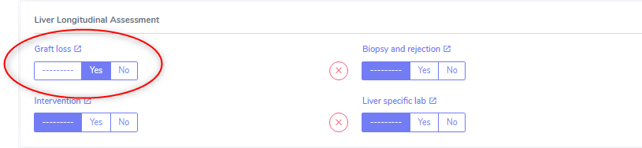
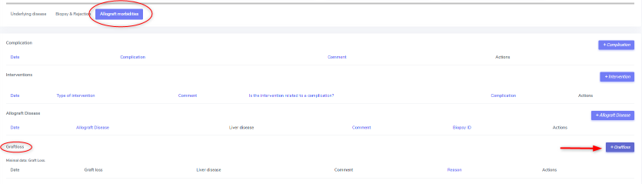
As soon as the graft loss is entered in the organ container, the follow-up form will be marked in red.
In case of a re-transplantation, the graft loss is automatically set as ‘cause leading to transplantation’ in the organ form and doesn’t need to be confirmed.
4.8. Samples
There are two time points at which samples are taken for the STCS: T0 and T12. The amount of blood drawn is specified below.
Plasma and DNA (T0) or only plasma (T12) are obtained from the samples and then stored.
The samples taken are entered in the STCS database and, if necessary, also removed from it if they are withdrawn for further use or destroyed at the patient’s request.
No samples are taken without the patient’s IC.
Blood sampling which is taken from a patient who is not transplanted will still be tested and stored for a period of two weeks in the Lab. This will not be billed if not entered in the STCS.
4.8.1. General rules and procedures
For details regarding the laboratory procedure see specific SOPs
The use of a “sample tracking sheet” for each patient is mandatory. The Lausanne version is the official version of the sample tracking sheet.
If a sample has been processed in a different manner then described in the SOP, the change has to be recorded in the sample tracking sheet.
Blood samples are not transferred between centers in the case of patient transfer.
Analyzed samplings must be entered in 3LC as soon as possible in the Sample section, as longest after 7 days.
4.8.2. Timepoint for Sampling blood draws
T0: A Sampling before TX can be taken -15 to 0 days before TX. T0 in ABOi living donation: The T0 blood draw has to be performed before the start of any induction of immunosuppression or conditioning regimen. The rule of -15 days is applied by analogy.
T12: Window for blood draw : +/- 15 days at 12 months (total one month period)
4.8.3. Sample registration (sample in)
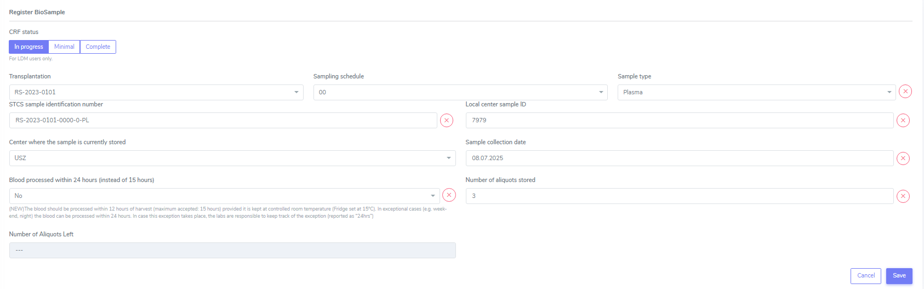
Choose the analyzed material. In the Baseline the order is:
Plasma
Extracted DNA
The sample identification Number will then be generated automatically by choosing:
the transplantation
the sampling schedule and
the sample type from the dropdown list in 3LC
Further entries:
the local center sample ID
the center where the sample is stored
the sample collection date and
the number of aliquots stored (Plasma always 3 unless there is no notice in the lab tracking sheet, DNA always 2)
4.8.4. Sample utilization and tracking (sample out)
If samples are used for a study or research, the removal of (or part of) the sample has to be entered in 3LC in the “Samples”-part in “BioSample out”.
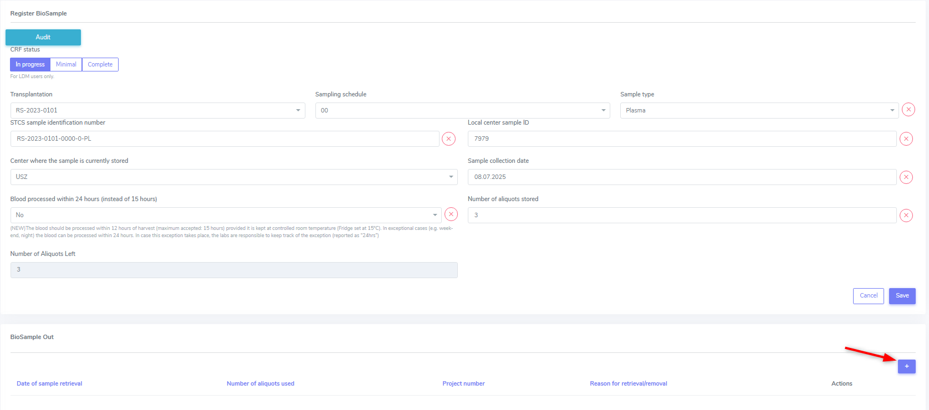
When removing samples please enter:
the date of sample retrieval
the number of aliquots (if entire tubes are removed or a tube is empty) used and
the reason for the retrieval/removal (study, consent withdrawl or other reason).
If retrieved for a study, always indicate the project for which the samples are used and the exact number of aliquots taken.
If tubes habe been removen for any other reason, indicate the reason and the number of removed tubes (e.g. the tube has been defrosted from the wrong patient and needs to be destroyed)
Warning
DNA is removed in drops, meaning, after a sampling removal the tube remains in the freezer. This means, that in the STCS in “Number of aliquots used” no entry is made unless the tube is completely empty. This also means, that if DNA is removed, we have to ask the ‘Typisierungslabor’ if there are tubes that have been used completely.
Warning
If plasma is removed, it’s always (!) a complete tube that has to be entered in ‘Number of aliquots used’.
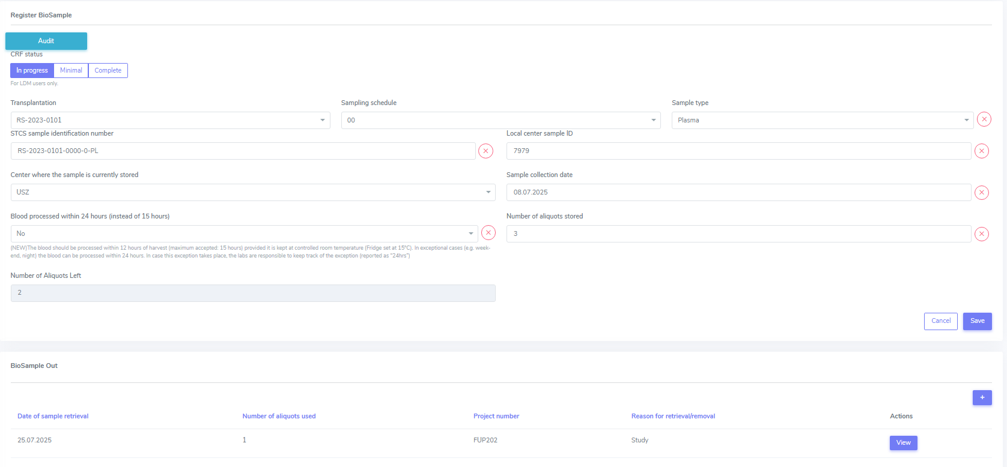
Sample destruction in case of change of consent
In case of consent withdrawal or other cases in which samples were entered and have now to be destroyed, please do not simply delete the sampling but enter the sample utilisation and traking field to remove them.
Warning
If samples are deleted completely and not just removed, there will be no money in the sample cost calculation for these samplings!
4.8.5. Quantity of drawn blood for the STCS Samples
Blood volume |
T0/T12 |
|---|---|
Children and adults > 40kg body weight |
7.5-20ml* |
Children 30-40 kg body weight |
0.8 x 7.5-20ml* |
Children 20-30 kg body weight |
0.6 x 7.5-20ml* |
Children 15-20 kg body weight |
0.4 x 7.5-20ml* |
Children 10-15 kg body weight |
0.2 x 7.5-20ml* |
Children 5-10 kg body weight |
0.1 x7.5-20ml* |
Children <5 kg body weight |
0.1 x7.5-20ml* |
*The exact quantity depends on the center:
HUG (GE): 5ml/5ml
CHUV (VD): 7.5ml/7.5ml
Inselspital (BE):7.5ml/7.5ml
HOCH (SG): 20ml/20ml
USB (BS): missing
USZ (ZH): 10ml/10ml
Example:
Pat. with 17kg: 0.4 x 10ml (USZ) = 4ml
Pat. with 17kg: 0.4 x 7.5ml (CHUV and Insel) = 3ml
4.8.6. Specific rules and procedures
Children of Jehovah’s Witness, patients with anemia: to reduce the blood use of these patients, volume and sampling will be decided on an individual basis by the transplant physician.
4.9. PSQ
PSQ stands for Psycho-Social Questionnaire.
All patients having signed the informed consent for the STCS are automatically part of the “Psychosocial Questionnaire” data collection. However, there are a few exclusion criteria:
Patient is under 18 years of age
Patient is not able to undestand German, French, Italian, or English
Patient has lack of clear and sound mind as evaluated by the transplant phsician
Inability to read.
These (except for the first option), are called ‘STCS protocol’ reasons for a completely missing PSQ.
The PSQ is not part of the minimal dataset.
All rules for sending out the PSQ and a possible reminder are explained in the “Standard Operating Procedure (SOP) for the Psycho Social Questionnaire (PSQ) Version 2.0”, available in the Document section for logged in members on the STCS website.
PSQ since 2023 is sent out on the following schedule: 0, 6 months, 1 year, 3 years, 5 years, 7 years, 10 years and every 5 years thereafter.
In case of a double transplantation, the PSQ is ongoing until failure of the longest functioning organ or death.
In case of a re-transplantation: if it is an immediate re-transplantation (Heart, Lung, Liver), we do not send out a PSQ-0 for the re-transplantation and follow the normal schedule thereafter.
In case of a delayed re-transplantation (Kidney, Pancreas, Islets, Small Bowel) we send out a second PSQ-0 and follow the normal schedule thereafter.
In case of a second transplantation, we do not send out a PSQ for this organ at all.
4.9.1. PSQ in the baseline
When opening a baseline and the IC is given, a PSQ-form is automatically attached. If you do not have a PSQ-0, you have two possibilities to remove the PSQ-form:
via the PSQ-form or
via the Follow-up register on the left side.
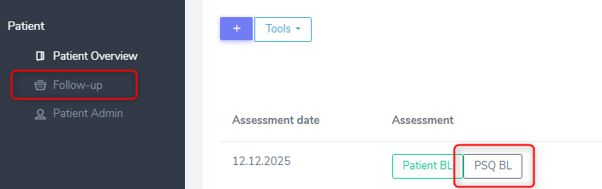
In the PSQ form: Open the PSQ form and set the answert to the question ‘Is the PSQ available and filled-in?’ to ‘False’.
In the Follow-up register: Select ‘Edit’ and then ‘Change availability’ in the PSQ section. A warning will appear and if you’re sure you want to change the form and delete possible entered PSQ data, select ‘Delete PSQ’. The answer to the question question ‘Is the PSQ available and filled-in?’ is then automatically set to ‘False’.
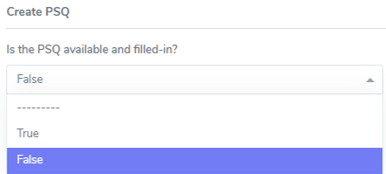
After that, in the section ‘Reason for completely missing PSQ date’ select the reason from:
Child (< 18 years)
Patient did not send back the PSQ
Sent back empty
Lost in hospital
STCS protocol
Patient death or drop out or
Patient too sick to complete the PSQ.
For a PSQ-0 STCS protocol according to the PSQ guidelines means the ones listed above in 4.9. plus a PSQ-0 in case of an immediate re-transplantation (Liver, Lung, Heart).
4.9.2. PSQ in a follow-up
When adding a follow-up you are asked if there is a PSQ available and filled in.

You can chose between ‘True’ and ‘False’. If selecting ‘False’, please indicate the reason for the missing PSQ from the drop-down list:
Child (< 18 years)
Patient did not send back the PSQ
Sent back empty
Lost in hospital
STCS protocol
Patient death or drop-out or
Patient too sick to complete PSQ
By selecting ‘True’ a PSQ FUP’ form will be addedd to the Patient Overview where the PSQ can be entered in 3LC (as shown below).
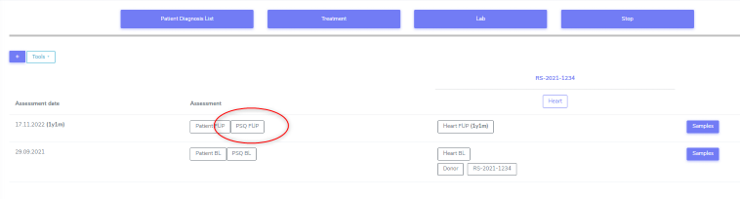
If you chose ‘True’ when adding a follow-up in 3LC and find that the PSQ has not been sent back by the patient, you can still enter ‘False’ in the ‘Follow-up’ (choose ‘Edit’ and enter ‘False’).
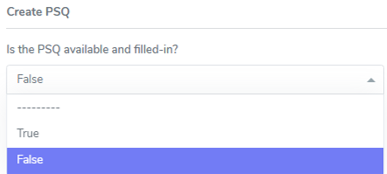
Either way, after that, in the section ‘Reason for completely missing PSQ date’ select the reason from:
Child (< 18 years)
Patient did not send back the PSQ
Sent back empty
Lost in hospital
STCS protocol
Patient death or drop out or
Patient too sick to complete the PSQ.
STCS protocol according to the PSQ guidelines are the ones listed above and the timepoints that, according to the new PSQ schedule we have since 2023, we do not send out a PSQ.
PSQ refused
“PSQ refused” - as it was available in the SIMED database - is not yet an option which can be selected as reason for a missing PSQ.
Tip
To have congruent data within the centers leave the PSQ empty or enter ‘STCS protocol’ as reason.